

Set the pass guide
Set an overall score and per-criterion minimums, and results and reports show a band — likely pass, needs review, or below the line.
Updated: Who can do thisOwners and Recruiters
The settings are in the Pass guide section of the job page. The band is a label and nothing more: it decides nothing and sends nothing to a candidate. The hiring decision is yours.
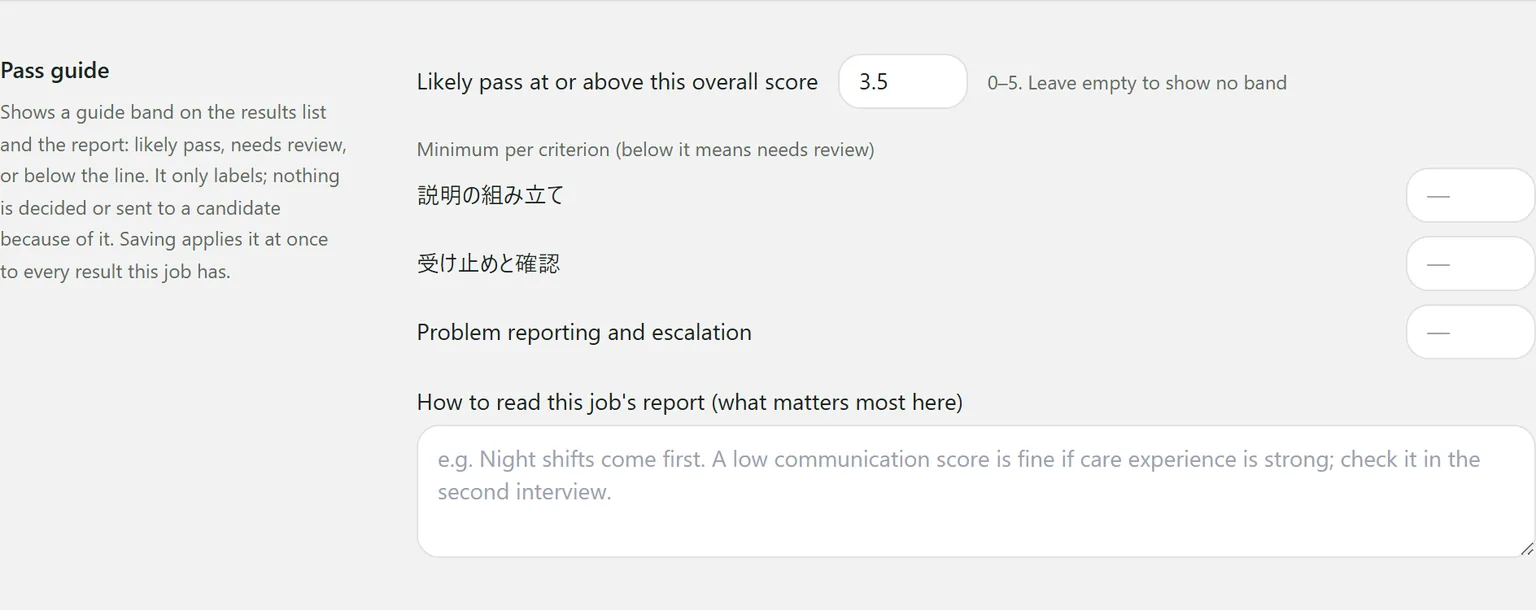
The settings
- Likely pass at or above this overall score: 0 to 5. Leave it empty and no band is shown.
- Minimum per criterion: only for the criteria that need one.
- How to read this job’s report: what matters most for this job, e.g. “Night shifts come first.” It is shown with the band on every report.
Saving applies the guide to every result for the job straight away.
How the band is decided
| Band | When |
|---|---|
| Below the line | The overall score is under the threshold |
| Needs review | At or above the threshold, but one of the conditions below applies |
| Likely pass | At or above the threshold, and none of them apply |
A result needs review when:
- a criterion is under its minimum
- a must-have is not met, or cannot be confirmed from what was said
- the interview did not run to the end
- a criterion was not assessed, because the interview never reached its question
The report gives the reason beside the band.
You cannot filter the results list by band. It is there to read alongside the scores, not to sort people out.
Still stuck?
Ask Hitoshiru AI from the Ask AI button at the bottom right of the console. If that does not answer it, email us.